Why Avioverse: Your Aviation Knowledge, Usable Again
Aviation professionals collect manuals, procedures, records and notes for years, then cannot find them when the work needs them. The idea behind Avioverse, and what it changes.
Dionysis Kefalas9 min read
On this page
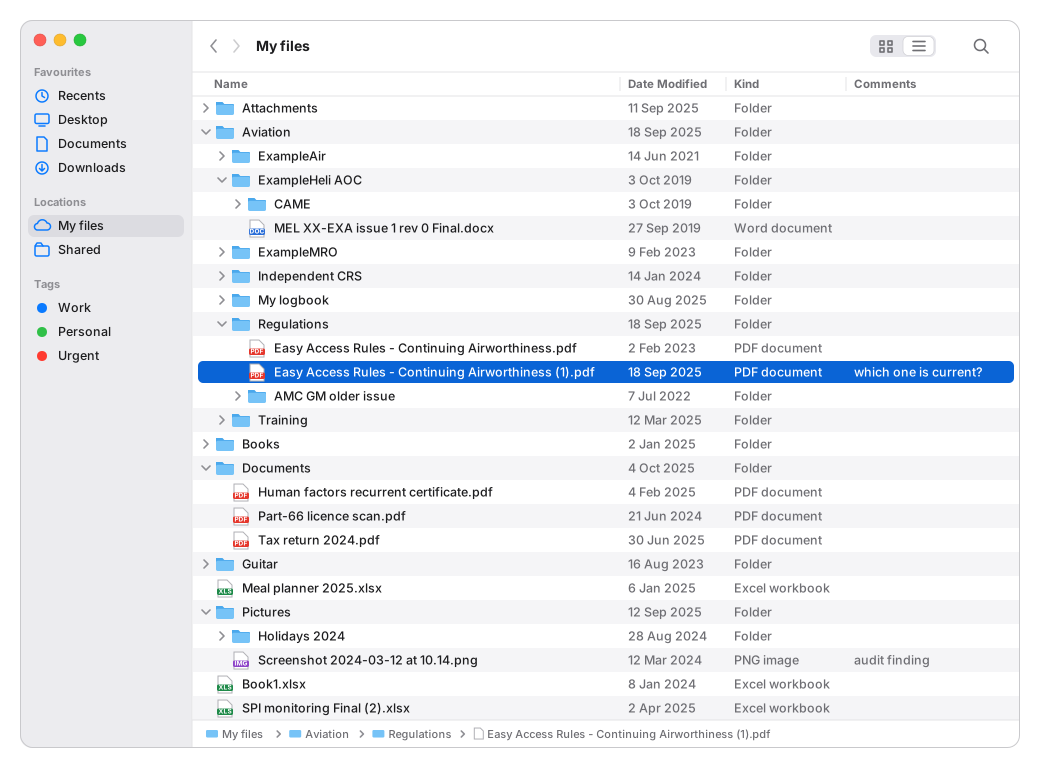
Most aviation professionals have a folder like this. It took years to build, and nearly everything in it was worth keeping. Ask its owner a question it can answer, and they will usually say: it's in there somewhere.
That sentence is the problem Avioverse was built to solve.
You were hired for what you know
An organisation hires a person for their judgement: the rules they know, the aircraft they have worked on, the audits they have run, the mistakes they have watched other people make. That experience is the asset. It grows every year, and it moves with the person from one employer to the next.
It also lives in places only that person can search. Some of it is in their head. The rest is spread across a hard drive, a cloud folder, an email archive, a notebook and a dozen chat histories.
The collection stops working
A collection of documents is only useful if you can get the right part of it back at the moment you need it. To use the folder above, you have to remember that the answer exists, remember where you put it, open it and read it again. When the collection is small, that works. After ten years it does not, and the bigger the collection grows, the less of it gets used.
Many professionals also keep a regulations library of their own: the Easy Access Rules downloaded as PDFs, a folder per domain, a second copy saved when they heard something had changed. EASA issues a new revision of the Easy Access Rules when the rules or their AMC and GM change, so a downloaded copy starts to age the day it is saved, and nothing in the folder tells you when it has. A checklist or a procedure review built on it inherits the old text. Why the version of a rule matters explains what that costs in practice.
Notes have it worse. Meeting notes, audit notes, lessons from a difficult defect: they are written once, with good intentions, and forgotten within days, because nothing brings them back when they would matter. A note nobody reads again is storage, not knowledge.
Everyone already brought one tool to work
Alongside the company's software, people use their own tools at work, and the one they use most is now a personal AI subscription. In Microsoft and LinkedIn's 2024 Work Trend Index, 75% of knowledge workers said they used AI at work, and 78% of those users brought their own tools. Aviation is no exception, and much of that use happens on company material with nobody's controls around it. The risks are set out in shadow AI in aviation.
A general chatbot is good at wording and explaining. It is not a second brain. It knows what you gave it in this conversation. A project holds a limited set of files. It cannot tell you which revision of a rule is current, it does not open the paragraph its answer depends on, and what you worked out with it last spring is buried in a chat history you will never scroll back to. Why chatbot memory is not enough goes into the detail.
The company's systems hold the company's records
Where an organisation has a QMS, an SMS or document control, those systems hold the organisation's records, as they should. They do not hold your experience, and you lose access to them when you leave. Many organisations have none of these and run on Word, Excel and email.
So the person is the integration layer. Only your head connects the rule, the AD, the company procedure, the aircraft and what you learned last time.
The idea: three sources, one brain
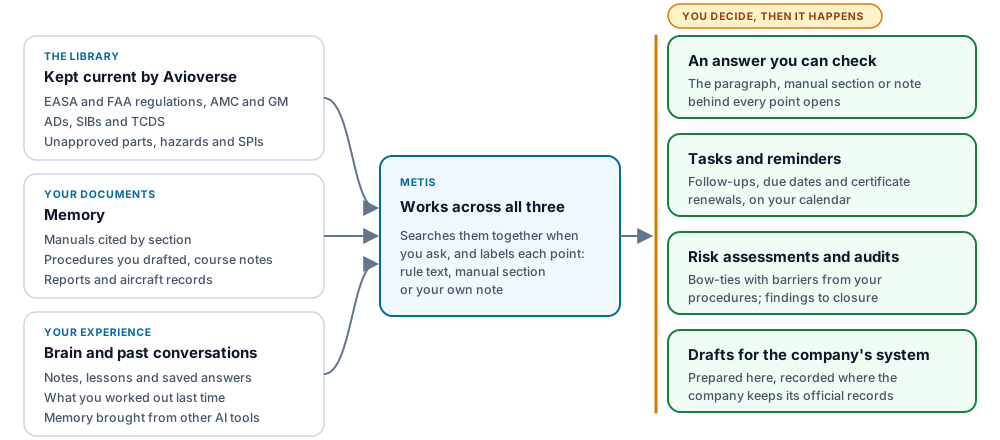
Avioverse puts three things in one workspace and lets them work together.
The library, kept current for you
Every aviation professional needs the same public material, and nobody should have to maintain their own copy of it. Avioverse holds EASA and FAA regulations with their AMC and GM and their versions, Airworthiness Directives and Safety Information Bulletins, type certificate data sheets, suspected unapproved parts cases from the EASA register and FAA notifications, a hazard and risk library, a catalogue of safety performance indicators and a glossary. Avioverse keeps it up to date, so you stop maintaining a private copy of the rules.
Your documents, readable from the moment you add them
The manuals you work from go into Memory and are cited by section: the MOE, CAME or OM you use every week. So do the procedures you drafted, your course notes, reports and aircraft records. Each document is read when you add it, and from then on its contents can be found, with the page, sheet or row they came from. Word, PDF, PowerPoint, Excel, CSV, text and images all work.
Your experience, kept and brought back
Brain is where your own knowledge lives: notes, lessons, decisions and answers worth keeping. When Metis gives you a good answer, Save to Brain keeps it as written. Your past conversations stay searchable, so what you worked out last time is still there. And if you have spent a year teaching a general AI assistant about your role and how you work, you can bring that memory across from ChatGPT or Claude instead of starting again.
Connected when you ask
Here is what the three sources do together. A quality manager at ExampleMRO reads a new Safety Information Bulletin on an inspection for one of the types the organisation maintains, and asks Metis:
Does our MOE cover what this SIB recommends, and what did I conclude about this last time?
Metis reads the bulletin from the library, finds the section of the MOE kept in Memory that covers the inspection, and brings back the Brain note from last year's audit and the conversation in which the applicability was worked through. The answer keeps the sources apart: the bulletin's text as the bulletin says it, the MOE section by its number, the note marked as the manager's own, so each can be checked on its own terms.
None of it needed filing, tagging or linking first. Avioverse connects things at the moment you ask, by searching everything you keep, not by quietly reorganising your files. When you review your Brain, each review suggests at most one connection, one duplicate and one possible conflict, with the evidence shown, and changes nothing until you agree.
From knowing to doing
Knowledge earns its keep when it turns into work. In Avioverse the same workspace that holds what you know also holds what you do with it:
- a date in a note becomes a task with a reminder, and a licence or training record becomes a certificate flagged 30 days before it falls due;
- the procedures in your MOE become barriers in your risk assessments, one per procedure, after you approve the list (how that works);
- an audit runs from a checklist, and each finding is followed through root cause and corrective action to closure;
- open items with outside parties go into trackers, and a recurring job becomes a procedure you run the same way each time.
Metis prepares the drafts. Nothing controlled is written, submitted or sent until you approve it. The decision stays where it belongs, with the accountable person.
Beside the company's systems, in their gaps, or as the system
The same professional meets three kinds of organisation, and Avioverse fits each:
- The company has its systems. Avioverse is where the work is prepared: the requirement found, the evidence structured, the draft written. The official record still goes into the company's QMS or SMS, from an export or straight from your draft. Personal SaaS and company SaaS explains how the two layers sit together.
- The company has gaps. Where the answer today is a spreadsheet and an email chain, Avioverse fills that one gap: a tracker for external findings or a redelivery with the other party invited, a register of tools or components, an audit programme, monthly SPIs.
- The company adopts Avioverse. A Team workspace holds the company's work under the company's access, with owners, admins and members, for a team of any size. Each person keeps their own Personal workspace beside it.
What is yours and what is theirs
A second brain for your career has to be clear about ownership, or nobody responsible for company data will let it near their organisation.
Your experience, notes and lessons, the checklists you wrote for yourself, public sources, your certificates and your past conversations are yours. Your Personal workspace belongs to your account, whoever employs you, and comes with you when you change job. The company's manuals, records, findings and reports are the company's: keep them only where the company allows, and work done in a company's Team workspace stays with that Team when you leave. Avioverse does not use your work to train AI models. What to keep in a personal workbench draws the line item by item.
Where to start
You do not need to move the whole folder in on the first day.
- Ask a question you already know the answer to, and open the paragraph behind Metis's reply. The library and the chat are free.
- Add the manual you open most. From then on it is cited by section.
- Bring your AI memory across from the assistant you already use.
- Save the next good answer to Brain, and write one line each time a piece of work teaches you something.
- Put your certificates in, so the next renewal finds you first.
The folder took years to build. With Avioverse, what you have learned stays where you can use it.
Frequently asked questions
What is Avioverse?
Avioverse is a second brain for aviation work. It keeps your manuals, documents, notes and past conversations in one workspace, beside a library of regulations, ADs, SIBs, unapproved-parts cases and hazards that Avioverse keeps current. Metis, its AI assistant, works across all of it and shows the source of every point. You decide what happens next.
Is Avioverse for individuals or for companies?
Both. It starts with the person: your Personal workspace belongs to your account, whoever employs you. A company can add Team workspaces for teams of any size, with owners, admins and members, beside its existing systems or in place of Word and Excel.
How is it different from a project in a general AI chatbot?
A chatbot works from what you give it in the conversation and a limited set of project files. Avioverse keeps your documents and notes as a lasting store, holds a versioned regulation and AD/SIB library for you, searches all of it when you ask, and opens the paragraph, manual section or note behind each point.
Do I have to organise or tag my documents?
No. When you ask, Metis searches the library, your manuals and documents, your Brain and your past conversations together. Brain can suggest connections, duplicates and possible conflicts; you confirm them. Nothing is merged, linked or rewritten without you.
Can I keep company manuals in Avioverse?
Keep company documents only where your employer allows it. They belong to the company. Your own notes, lessons, checklists, public sources and certificates belong to you and stay with your account when you change job. Work done in a company's Team workspace stays with that Team.
Does Avioverse use my documents to train AI?
No. Avioverse does not use your work to train AI models. Personal work is private to your account.
Which plan includes the second brain?
Brain and memory across conversations are part of Pro. On the Free plan you can ask Metis, search the library by word and track your certificates.
Related
- A Second Brain for Aviation ProfessionalsArticle · 11 min
- What to Keep in a Personal Aviation WorkbenchArticle · 8 min
- Shadow AI in Aviation: Personal Tools at WorkArticle · 7 min
- ChatGPT Memory Is Not Enough in AviationArticle · 9 min
- Personal SaaS vs Company SaaS in AviationArticle · 9 min
- MOE Procedures as Risk Assessment BarriersArticle · 6 min
- Version-Aware Tools for EASA RegulationsArticle · 7 min
Written by Dionysis Kefalas. Retired Hellenic Air Force Captain and founder of Avioverse. About the author
Write, link and search your own notes in one knowledge base, and on a paid plan Metis can recall them in your chats. Opens in October 2026.