Use Case: Turn Your MOE Procedures Into Risk Assessment Barriers
Avioverse reads your MOE and internal procedures one section at a time and proposes them as bow-tie barriers. Nothing joins your list until you approve.
Dionysis Kefalas6 min read
On this page
ExampleMRO's safety manager opens five of last year's risk assessments. The same control appears in all five, written five ways: "IAW MOE", "tool control procedure", "calibrated tooling", "see MOE 2.5", and once not at all. Nobody can say which assessments rely on the calibration recall, so when the recall list changes, nobody knows which assessments to look at again.
The barriers were never missing. They sit in the exposition, numbered: 2.4 Acceptance of Tools and Equipment, 2.5 Calibration of Tools and Equipment, 2.16 Release to Service. What was missing was one list that every assessment draws from, under one wording.
Avioverse builds that list from the manual itself. Metis reads the MOE one section at a time, proposes each procedure as a barrier with the manual's own heading as its title, and posts the list in the chat. You change it, or approve it as it is. Nothing is added until you do.
What a barrier from a procedure looks like
A barrier needs two things: a name everyone uses, and a sentence that says what it stops.
- Title: the manual's own heading with its reference in front, such as "MOE 2.5 Calibration of Tools and Equipment". The reference tells you where the barrier is documented. It also keeps MOE sections apart from internal procedures.
- Description: one or two sentences on what the procedure prevents or catches, in the manual's own terms: who does it, when, and the record kept. "The Stores Supervisor recalls tools before their calibration due date from the weekly recall list; a tool past its date is withdrawn and labelled DO NOT USE" can be matched to a threat. "Describes the calibration process" cannot.
The description matters more than it looks. When Metis drafts a bow-tie, it decides which barriers fit a threat by reading their titles and descriptions. A description that says what the procedure does gets the barrier used in the right places.
How it works
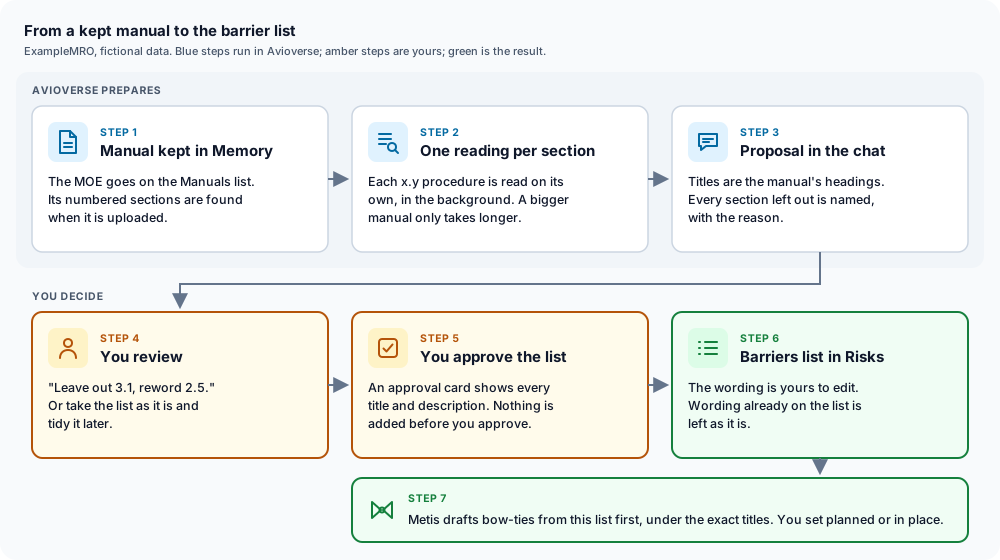
- Keep the manual in Memory. Upload the MOE to the Manuals list on Memory's Documents tab, with its issue and revision. Avioverse finds the numbered sections when the manual is uploaded. See how memory works.
- Ask in the chat. "Make barriers from our MOE" is enough. Name the parts to read if you want only some of them, for example "Parts 2 and 3".
- The manual is read in the background. Each x.y section is read on its own, with its sub-sections folded in, so 2.16.1 and 2.16.2 travel with 2.16 as one barrier. No section shares a reading with another, and the manual is never read in one go, so a 300-page exposition is read the same way as a 30-page one. It only takes longer.
- The proposal arrives in the chat. Every proposed barrier is listed with the exact title and description that would be added. Every section left out is named with the reason, and so is any section that could not be read.
- You review. Say what to change in plain words: "leave out 3.1", "reword 2.5", "shorten the descriptions". Or take the list as it is and tidy it later.
- You approve. An approval card shows every title and every description. The barriers are added only when you approve, and wording already on the list is left as it is. See approvals, undo and your data.
Which sections become barriers
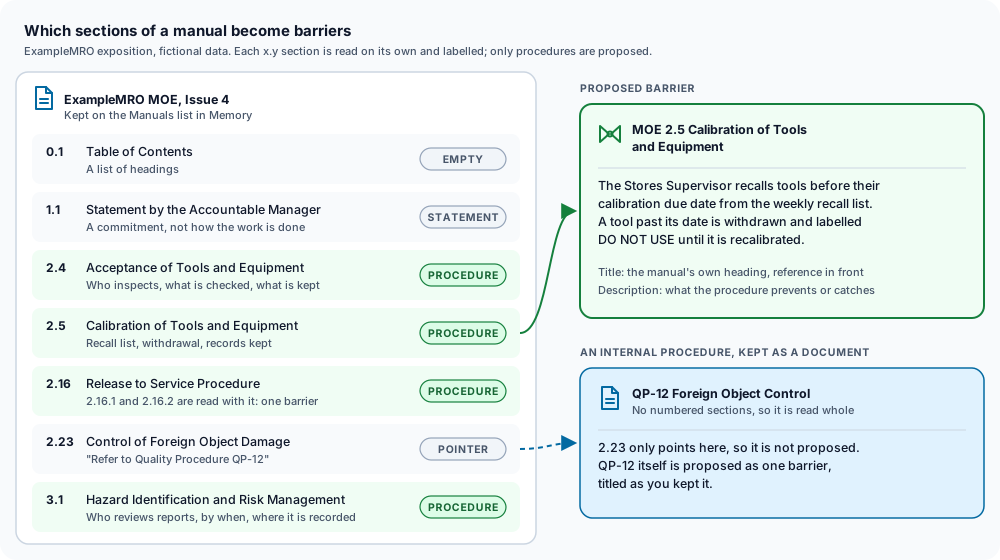
Each section is labelled before anything is proposed:
A pointer is a prompt, not a gap. When 2.23 says "Refer to Quality Procedure QP-12", the barrier is QP-12 itself. Keep it as a document and include it in the request.
Internal procedures
Internal procedures usually live as separate documents. Keep each one in Memory and name them together with the manual: "make barriers from the MOE and QP-07 to QP-12". A document without numbered sections is read whole and becomes one barrier under its own title. Keep the reference in the document title, such as "QP-12 Foreign Object Control", and the list stays readable: the Barriers tab sorts by title, so MOE sections and internal procedures sort apart.
What stays with you
- The list. Changing and removing barriers stays in Risks › Barriers. You can edit the wording at any time, and remove a barrier that no assessment uses. A finalised assessment keeps the wording it was finalised with.
- The status in each assessment. When Metis drafts a bow-tie, it reads the Barriers list first and uses the barriers that fit, under their exact titles. A barrier that is on the list but in no assessment yet is proposed as in place, and the draft names it in its assumptions. You set planned or in place on the bow-tie.
- Effectiveness. Being on the list says the organisation has the barrier, not that it works. Whether it works is recorded by a person, from evidence, with Confirm effectiveness on the Barriers tab. Metis never sets it.
- The rating and the decision. Severity, likelihood, finalising and accepting the risk stay with the people your safety management system names. The worked bow-tie example walks through those judgements.
Assessments you already have
The same list helps with assessments done by hand. Attach one in the chat and ask Metis to rework it. It treats your assessment as your draft: it keeps the threats, consequences and barriers that hold up, in your wording, draws barriers from the list first as it does for any draft, and says item by item what it changed and why. When you save it, it becomes a new assessment unless you name a saved one to update. The file you attached is not changed.
Where it stops
- It needs the manual on the Manuals list. Only a manual uploaded there keeps its numbered sections. A document kept any other way is read as one procedure, which suits a single internal procedure and not an MOE.
- The summaries say only what the text says. They do not judge whether a procedure is adequate, and they do not check whether the manual is the current issue. Read the list before you approve it.
- It uses your AI allowance. Each section is one AI reading, charged like any other AI work. If the allowance runs out partway, the sections not read are named, and you can ask again later. Reading manuals is part of the paid plan; see pricing.
- A procedure is not always a good barrier. A broad chapter, such as "maintenance procedures", stops nothing on its own. Split it into the specific controls it contains before relying on it.
Frequently asked questions
Does Avioverse add my MOE procedures to risk assessments automatically?
No. Metis proposes a list of barriers from the manual and posts it in the chat. Nothing is added to your Barriers list until you approve that exact list, and nothing reaches an assessment until you build or accept a draft and set each barrier's status yourself.
Can it handle a long exposition?
Yes. Each x.y section is read on its own, in the background, so a longer manual only takes longer. Above 400 sections in one reading, Metis asks which parts to read, for example Parts 2 and 3.
Which sections become barriers?
Sections that say who does what, how or when, usually with the record kept. Policy statements, sections that only point to another document, contents pages and form templates are not proposed, and each one is named in the list so you can see what was left out.
Can I add internal procedures as well as the MOE?
Yes. Keep each internal procedure as a document in Memory and name it in the same request. A document without numbered sections becomes one barrier under its own title, so a reference such as QP-12 in the title keeps internal procedures apart from MOE sections.
Does a procedure on the barrier list mean the barrier works?
No. The list records the barriers your organisation has. Whether one is effective is a separate judgement a person records from evidence, on the Barriers tab, once the barrier is in place in a finalised assessment.
Related
- Bow-Tie Risk Assessment in Aviation: A Worked ExampleArticle · 13 min
- Aviation Risk Matrix: Likelihood, Severity and EASAArticle · 12 min
- Hazard Identification and Safety Risk Management under EASAGuide · 17 min
- Import Aviation Actions as Tasks in AvioverseArticle · 11 min
- AI for EASA Part-145 Maintenance ComplianceArticle · 8 min
Written by Dionysis Kefalas. Retired Hellenic Air Force Captain and founder of Avioverse. About the author
Build the bow-tie by hand or have Metis prepare a first draft, score it on your workspace matrix, and finalise it yourself when you are satisfied. Opens in October 2026.